Seller Product Feeds
Online product feed instructions

|
|
|
| Download Omacro CSV online product feed template | Google Merchant Center XML and .csv (txt) file formats |
- To be part of your suppliers’ online dealer locator, we need a product feed so we know where to send customers for each product. You can see the list of companies that use our platform here.
- We can accept just about any type of feed endpoint as long as we can fetch the file from a URL (can be http, https or ftp). It can be username and password protected if needed. We cannot accept SFTP or FTPS at this time.
- We can accept a simple feed with a limited amount of data columns (please download and see example csv template).
-
Most ecommerce platforms have native options or third-party apps to create feeds. Some platforms will natively produce the Google Merchant Center Feed which we can also accept. This article will give you the details on the feed implementation, however we have supplemental instructions for the most popular ecommerce platforms in our help section.
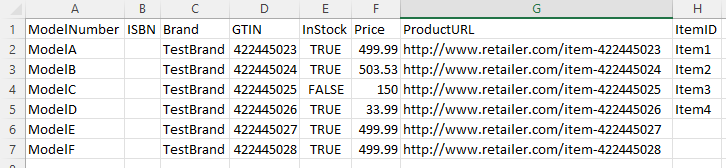
General Fields Needed
|
ModelNumber |
Manufacturer model number or SKU |
|
ISBN |
(not required) International Book Number. This field is not required but the field needs to be in the file |
|
Brand |
Product's brand name |
|
GTIN |
UPC and/or EAN number |
|
InStock |
TRUE or FALSE |
|
Price |
Price without currency type using decimal separator. For example 79.25. We derive the proper currency when you assign your feed to the country (more on that below) |
|
ProductURL |
Your product detail page's product URL. URL may be http or https and may also contain your custom UTM parameters to track the performance of traffic we send to you via Google Analytics. We suggest appending your link with &utm_source=omacro&utm_medium=link&utm_campaign=omacro |
| ItemID | (not required) This field is used if you have multiple retail store locations and submit product inventory to show in our local inventory results. You can read more about that here. |
|
Google Merchant Center File
OR we can accept the standard “Google Merchant Center” feed that you may already be providing to Google for Product Listing ads (details here). We recommend providing a feed with all of the brands/products you carry. We will only save/store info on the brands we work with, however we are regularly adding new brands. Providing all your products will ensure that you will show up as we add new brands. |
|
|
Google Drive Sheets
We can even accept the above files from a Google Drive Sheet that has been published to the web as a .CSV. This would allow us to pick up updated files every 24 hours. |
|
Step 1
Visit the Online product feed management page within omacro
located here
.
Step 2
Select "Create New Schedule"

Step 3
Fill in details associated with your feed. In this section, you would typically have a single feed (multiple feeds if you service different countries). If your online products reside in a single retail selling location, you can set the ‘Store Inventory’ option to that single location. If you have more than one location with inventory, please see our Local Inventory Feed instructions for your stores (still use this for online).
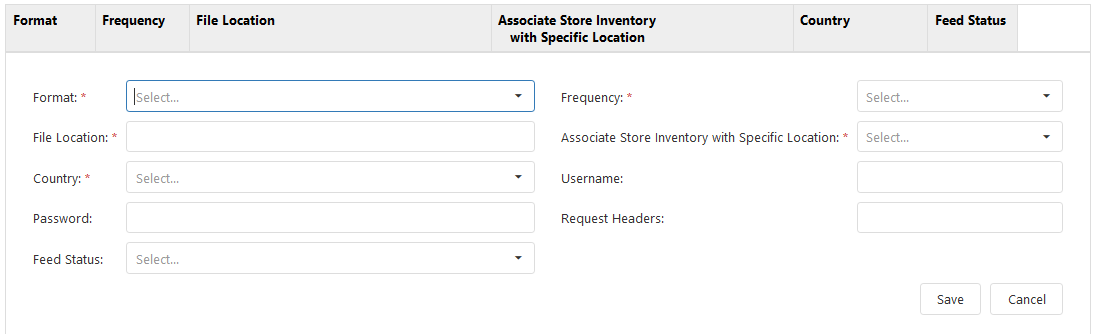
| Format | omacro .csv or XML formats, or Google Merchant Center .csv or RSS/XML (see top of page for file templates) |
| File Location | must be http, https or FTP (We cannot accept SFTP or FTPS at this time) |
| Country | Assign a single feed with a single country. You may have additional feeds assigned to other countries. |
| Password | (not required) Add password if your feed is protected by a password |
| Username | (not required) Add a user name if your feed location requires it |
| Feed Status | Enable or Disable |
| Frequency | How often we process your file, we suggest 24-hours |
| Associate Store Inventory with Location | If your online products reside in a single retail selling location, you can set the ‘Store Inventory’ option to that single location |
| Request Headers |
(Not required) The HTTP Authorization request header can be used to provide credentials that authenticate a user agent with a server, allowing access to a protected resource |
Step 4
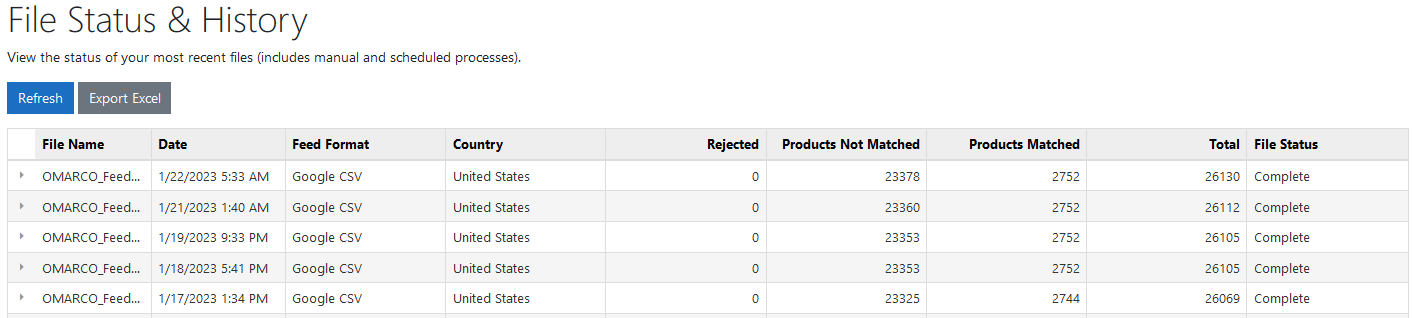
Feeds are checked every 4 hours for product updates. Once your product feed processes, you can check back on this page for the status and product matches.