
Supplier System Management
Use the request failure report to diagnose Buy Now and locator errors.
Request Failure Report Error Codes & Usage
Introduction
When you encounter failures with the 'Buy Now' web service, the system provides distinct messages to help you troubleshoot. These messages can indicate issues with a product page setup or misconfiguration. Below is a brief guide to navigating and managing these failures and the fields listed within the report grid.
-
Product Identifier - This field contains the identifier used to request data within the locator. This information is passed to our services. Please note, this field may also contain the Brand and Model of a product you have configured within Omacro.
-
Country - The detected or chosen country of the user making the request. This is useful for determining if a product link for a specific country should be added.
-
Market - This field indicates what step the issue occurred. If blank, the issue occurred very early in the request chain, otherwise, which Market tab the issue likely appeared in.
-
Code - The error code generated. See the section "Error Codes Definitions" for details related to various codes used and their potential meanings and resolutions.
-
Error - The high-level error message of the issue detected. For more details, see the section "Error Codes Definitions".
-
Endpoint - The webservice endpoint with parameter data that generated the error. You can use this to help troubleshoot custom Buy Now coding if you are not using our prebuild locator code.
-
Referring Page - This is the page where the initial request was made from. This field is very useful for identifying which page (often a product page) may not be properly configured, such as not using the correct identifier, etc. For more details on how to get more information to display in this field, please see the section entitle "How To Setup Referring Page"
-
Total - The total number of separate occurrences where users experienced an issue. Use this field to determine the priority of which items to address. The higher the number, the more traffic and interest that the product in question is generating.
-
Last Occurred - The last time the issue was encountered by a user or when the service called threw the error in question.
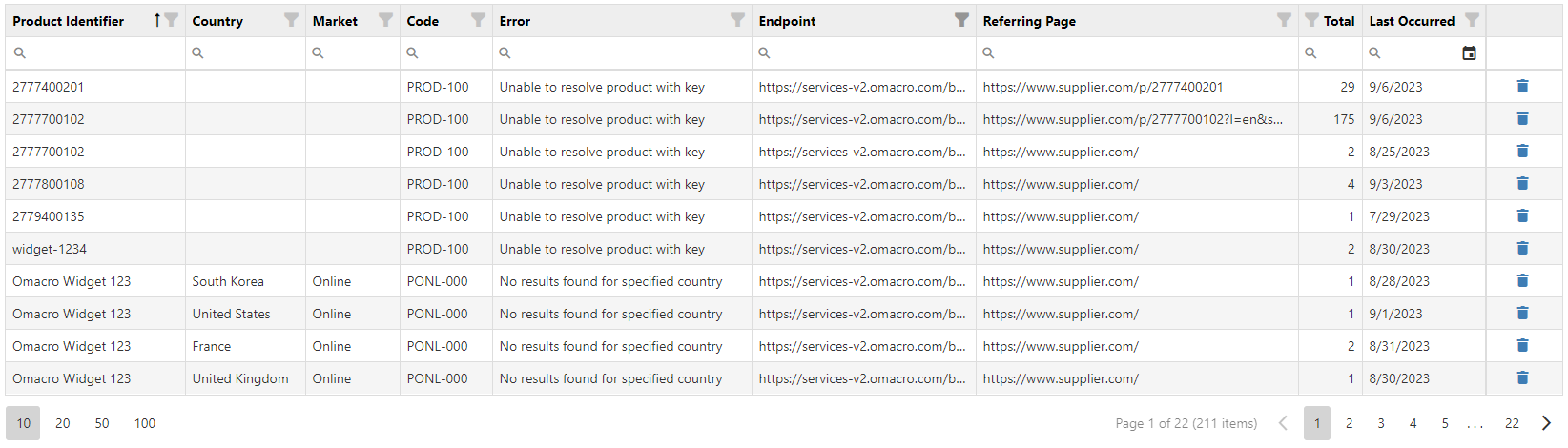
Below is a sample grid displaying failures and sorted to display products not properly configured within Omacro first (products whose identifiers do not exist within Omacro), then followed by products that were detected but show no seller results (lack of seller links).
Error Codes Definitions
Below is a chart listing the various error codes that may be generated within Buy Now. Refer to this list to determine a recommended course of action.
| Code | Locator Type |
Market |
Message | Description | Resolution (if any) |
|
CD-000 |
General
Distributor Locator
|
Online |
No results found for specified country |
While doing a lookup for the specified country, no results were found. |
Choose a different country and try again. |
|
CD-100 |
General
Distributor
Locator
|
Online |
Unable to resolve country |
While doing a lookup for the specified country, the country specified was invalid. |
Check to determine the country value used is a 2-digit ISO standard country name and try again. |
|
CONL-000 |
General
Dealer Locator
|
Online |
No results found for specified country |
While doing a lookup for the specified country, no results were found. |
Choose a different country and try again. |
|
CONL-100 |
General
Dealer Locator
|
Online |
Unable to resolve country |
While doing a lookup for the specified country, the country specified was invalid. |
Check to determine the country value used is a 2-digit ISO standard country name and try again. |
|
VLDT-100 |
Product Locator |
Validate |
Unable to resolve product with key |
While performing a product lookup, the service was unable to find a match using the product identifier provided. |
Check to ensure the product identifier (GTIN, SKU, Model) matches one setup already within Omacro. If none found, add the product identifier to a new or existing omacro product or change the identifier being used. |
|
VLDT-101 |
Product Locator |
Validate |
Unable to resolve product with key |
While performing a product lookup, the service was unable to find a match using the product identifier provided. |
Check to ensure the product identifier (GTIN, SKU, Model) matches one setup already within Omacro. If none found, add the product identifier to a new or existing omacro product or change the identifier being used. |
|
VLDT-200 |
Product Locator |
Validate |
Unable to resolve parent product from style |
While attempting to look up related products variants, lookup services failed to find a match when one was expected. |
This is an internal issue. Contact support for assistance. |
|
VLDT-201 |
Product Locator |
Validate |
Unauthorized product request |
While doing a product lookup, the supplied company ID does not match the matching product's owner. |
This is an internal issue. Contact support for assistance. |
|
PONL-000 |
Product Locator |
Online |
No results found for specified country |
While doing a lookup for the specified country, not results were found. |
Choose a different country and try again. |
|
PONL-100 |
Product Locator |
Online |
Unable to resolve country |
While doing a lookup for the specified country, the country specified was invalid. |
Check to determine the country value used is a 2-digit ISO standard country name and try again. |
|
PONL-200 |
Product Locator |
Online |
Unable to resolve product |
While doing a lookup for the specified product, no results found for Company ID and Product ID combination. |
This is an internal error and may result from an incorrect product identifier or company identifier. Contact support for assistance. |
|
PONL-300 |
Product Locator |
Online |
Unauthorized domain zone |
Testing domain against the domain whitelist failed. |
Add the domain of your production or test environment to the domain whitelist within the Buy Now Settings page. |
|
PLOC-100 |
Product Locator |
Local |
Unable to resolve product |
While doing a lookup for the specified product, no results found for Company ID and Product ID combination. |
This is an internal error and may result from an incorrect product identifier or company identifier. Contact support for assistance. |
|
PLOC-300 |
Product Locator |
Local |
Unauthorized domain zone |
Testing domain against the domain whitelist failed. |
Add the domain of your production or test environment to the domain whitelist within the Buy Now Settings page. |
How To Setup A Referring Page
Please note that the Referring Page field is determined by the security referrer policy of the page where the Buy Now script is placed. To obtain a full URI (path and query information), you may need to adjust your page's referrer policy accordingly if it does not pass this information by default. The following example helps to illustrate how to set the referrer policy for a page:
<meta name =" referrer " content =" no-referrer-when-downgrade ">
In this example, a meta tag is added to the header of the page and the "name" property is set to "referrer" and the "content" property is set to "no-referrer-when-downgrade".
Here are the possible referrer policy values:
- no-referrer: No referrer information is sent.
- no-referrer-when-downgrade: This is the default if no policy is specified. It sends the full URL when the protocol is the same or upgrades from HTTP to HTTPS, but not when downgrading from HTTPS to HTTP.
- origin: Only send the origin of the document as the referrer. Specifically, strip out the path, parameters, and fragment.
- origin-when-cross-origin: Send the full URL when performing a same-origin request, but only send the origin when making a cross-origin request.
- same-origin: Send the full URL when performing a same-origin request, but don't send any referrer information for cross-origin requests.
- strict-origin: Send only the origin (no path, parameters, or fragment) for same-origin and cross-origin requests. Don't send anything when downgrading from HTTPS to HTTP.
- strict-origin-when-cross-origin: Send the full URL for same-origin requests, the origin for cross-origin requests, and no referrer for HTTPS to HTTP downgrades.
-
unsafe-url: Always send the full URL, regardless of whether the request is same-origin or cross-origin.
The most common default referrer policy set by browsers (if not otherwise specified) is "no-referrer-when-downgrade". However, due to privacy concerns and the desire to give users more control over their data, some websites and web applications might opt for stricter referrer policies. Keep in mind, making changes to your page referrer settings may inherit certain risks that you'll need to weigh.