
Advanced Buy Now
Adjust map search radius on the Buy Now popup
Having difficulty seeing results appear due to the default search radius within the Buy Now popup? By default, the initial map radius of 50 miles (80 kilometers) with a fallback radius of 150 miles (241 kilometers) produces results for most customers.
If the default set of radiuses are not sufficient, say for example, if you're using the Buy Now popup to strictly display service centers or rental providers, where these locations may be few and far between or if a seller is far away from a regions center or popular city, it may be necessary to increase the primary or secondary search radius of the Buy Now popup.
To adjust the radius of either the primary or secondary search, do the following:
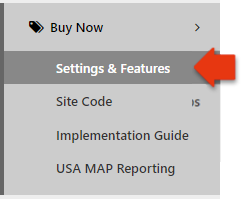
- From the omacro administration navigation menu (on the left), got to Buy Now -> Settings & Features page
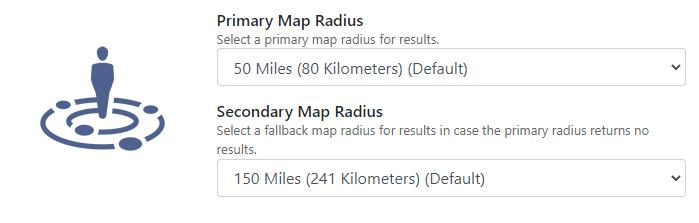
- Navigate to the Local Market Options section and choose the appropriate option for Primary Map Radius and Secondary Map Radius.
Pro Tips:
In most instances, adjusting the Secondary Map Radius should be sufficient. Use caution: Adjusting the map search radius may adversely impact load times as the radius increases. If you notice excessive load times, it is suggested to reduce the radius. Thus, a balanced approach of adjusting the Secondary Map Radius will keep performance quick for the majority of users as they will rely on the Primary Map Radius.
Make sure that your Secondary Map Radius is greater than your Primary Map Radius, otherwise it will be ineffective.
Finally, don't forget to save your settings. Please allow up-to 10 minutes for the results to be reflected within the Buy Now Popup for a specific location.