
Supplier Implementation
Managing international distributors for distributor locator
Manage Your International Distributors
Website Code
For a website implementation guide for the Distributor Locator, please
click here
.
Distributor Management
There are a couple ways to setup the Distributor Locator depending on your needs.
- Display Distributor Results By Country (User can choose country)
- Display All Distributors Regardless of Country
1. Display Distributor Results By Country (User can choose country)
You can designate which sellers are Distributors within omacro which will inform the Distributor Locator which companies to show based on the location. To do this, you'll need to navigate to the My Partner List page.
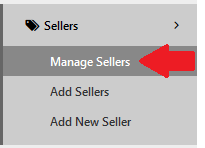
Once on the My Partner List page, choose a company listed among your network to designate as a Distributor.
Once a company has been located on the My Partner List page, scroll to the right and click on the Edit  icon.
icon.
Next, locate the Distributor column and check it  This denotes the company as a Distributor (among other potential seller types it can carry). Now choose the countries the Distributor is located in from the field located in the Distributor Countries column.
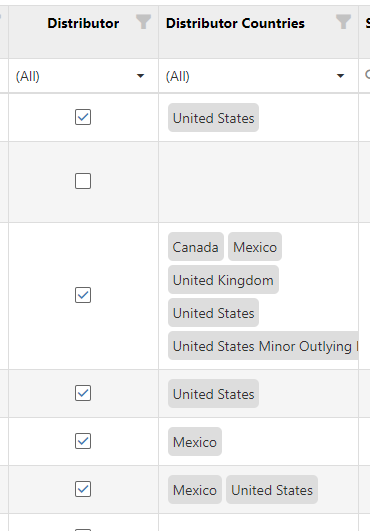
 the column Distributor.
 Finally, when done editing, click the Save  icon.
icon.
2. Display All Distributors Regardless of Country
You can designate which sellers are Distributors within omacro which will inform the Distributor Locator which companies to show based on the location. To do this, you'll need to navigate to the My Partner List page.
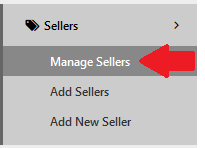
Once on the My Partner List page, choose a company listed among your network to designate as a Distributor.
Once a company has been located on the My Partner List page, scroll to the right and click on the Edit  icon.
icon.
Next, locate the Distributor column and check it  This denotes the company as a Distributor (among other potential seller types it can carry).
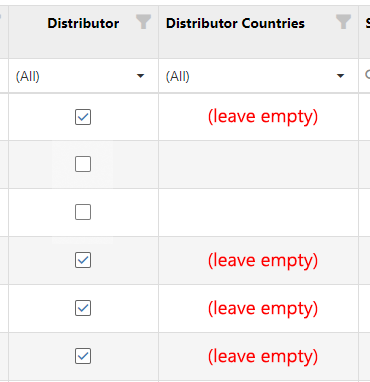
 the column Distributor.
 Finally, when done editing, click the Save  icon.
icon.