
Dealer Locator
Embedding dealer locator within a website page
You can embed the locator directly on to a page. Assuming you have gone through the steps of adding omacro’s buy now code snippets to your page, use the following example to render the locator within the page itself.
To see a live demonstration, please visit our Live Demo Site
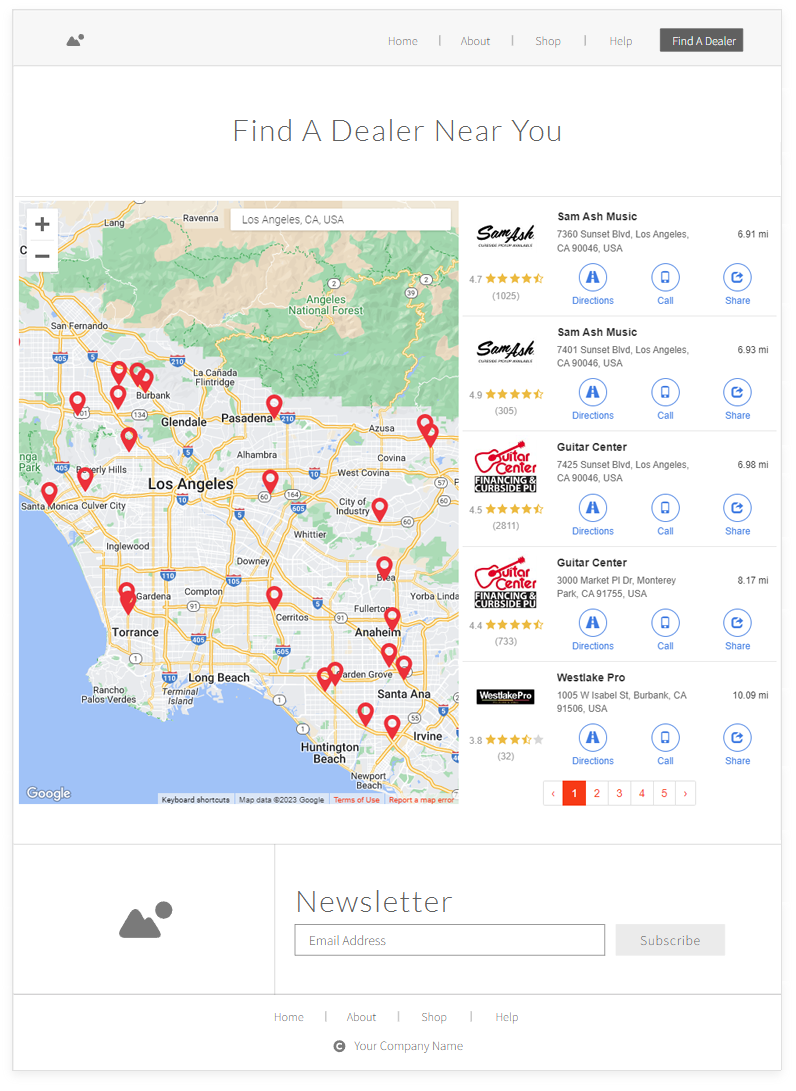 An example of a dedicated Dealer Locator with custom styles.
Step 1: Add CSS Class to the Page
Ensure you have an element on the page with the class name of "oma-omacro".
- <div class="oma-omacro"></div>
Step 2: Add JavaScript to the Page
Add the following script to the page anywhere below the HTML element mentioned in Step 1. The script is designed to trigger the render function within the Buy Now script. This script loads the widget once page loads rather than via a button click.
The magic occurs within the omacro.buynow.widget.show() function. This function accepts several parameters:
-
Product Identifier
required - "*" (for generic dealer locator) or SKU or Omacro Product ID (SKU preferred)
-
Market Tab - Value can be either "online" or "local" and specifies the tab to market to show immediately.
-
2-Character ISO Country Code - "us", "ca", "au", etc.
General Dealer Locator Example
- <script>
- document.body.addEventListener("loaded.omacro.buynow", function (e) {
- e.preventDefault();
- omacro.buynow.widget.show('*', 'local', 'us');
- }, false)
- </script>
Product Based Dealer Locator Example
- <script>
- document.body.addEventListener("loaded.omacro.buynow", function (e) {
- e.preventDefault();
- omacro.buynow.widget.show('LA12345', 'online', 'ca');
- }, false)
- </script>
Step 3 : Add Cascading Style Sheet to the Page
Add the following CSS (modify as needed) to adjust the style of the Buy Now content so that it properly renders within the page document.
- <style type="text/css">
- body.oma-modal-in {
- overflow: auto !important;
- }
- .oma-omacro .oma-buynow {
- opacity: 1 !important;
- display: block !important;
- position: relative !important;
- top: auto !important;
- right: auto !important;
- bottom: auto !important;
- left: auto !important;
- }
- .oma-omacro .oma-buynow .oma-dialog {
- transform: none !important;
- transition: none !important;
- left: auto !important;
- margin-right: auto !important;
- margin-left: auto !important;
- }
- .oma-omacro .oma-buynow .oma-dialog .oma-content {
- box-shadow: none !important;
- background-color: transparent;
- }
- .oma-omacro .oma-buynow .oma-dialog .oma-header .oma-title {
- display: none;
- }
- .oma-omacro .oma-buynow .oma-dialog .oma-content .oma-close {
- display: none;
- }
- .oma-omacro .oma-buynow .oma-dialog .oma-content .oma-tabs {
- border-bottom-color: #ddd;
- background-color: transparent;
- }
- .oma-omacro .oma-buynow .oma-dialog .oma-content .oma-tabs>li>a {
- color: #337ab7;
- background-color: transparent;
- }
- .oma-omacro .oma-buynow .oma-dialog .oma-content .oma-tabs>li>a:focus,
- .oma-omacro .oma-buynow .oma-dialog .oma-content .oma-tabs>li>a:hover {
- text-decoration: none;
- background-color: #eee;
- border-color: #eee #eee #ddd;
- }
- .oma-omacro .oma-buynow .oma-dialog .oma-content .oma-tabs>li.oma-active>a,
- .oma-omacro .oma-buynow .oma-dialog .oma-content .oma-tabs>li.oma-active>a:focus,
- .oma-omacro .oma-buynow .oma-dialog .oma-content .oma-tabs>li.oma-active>a:hover {
- color: #555;
- cursor: default;
- background-color: #fff;
- border: 1px solid #ddd;
- border-bottom-color: transparent;
- }
- .oma-omacro .oma-buynow .oma-footer {
- border-top-color: transparent;
- background-color: transparent;
- }
- .oma-omacro .oma-backdrop {
- display: none !important;
- }
- </style>